
What Are Semantic Views?
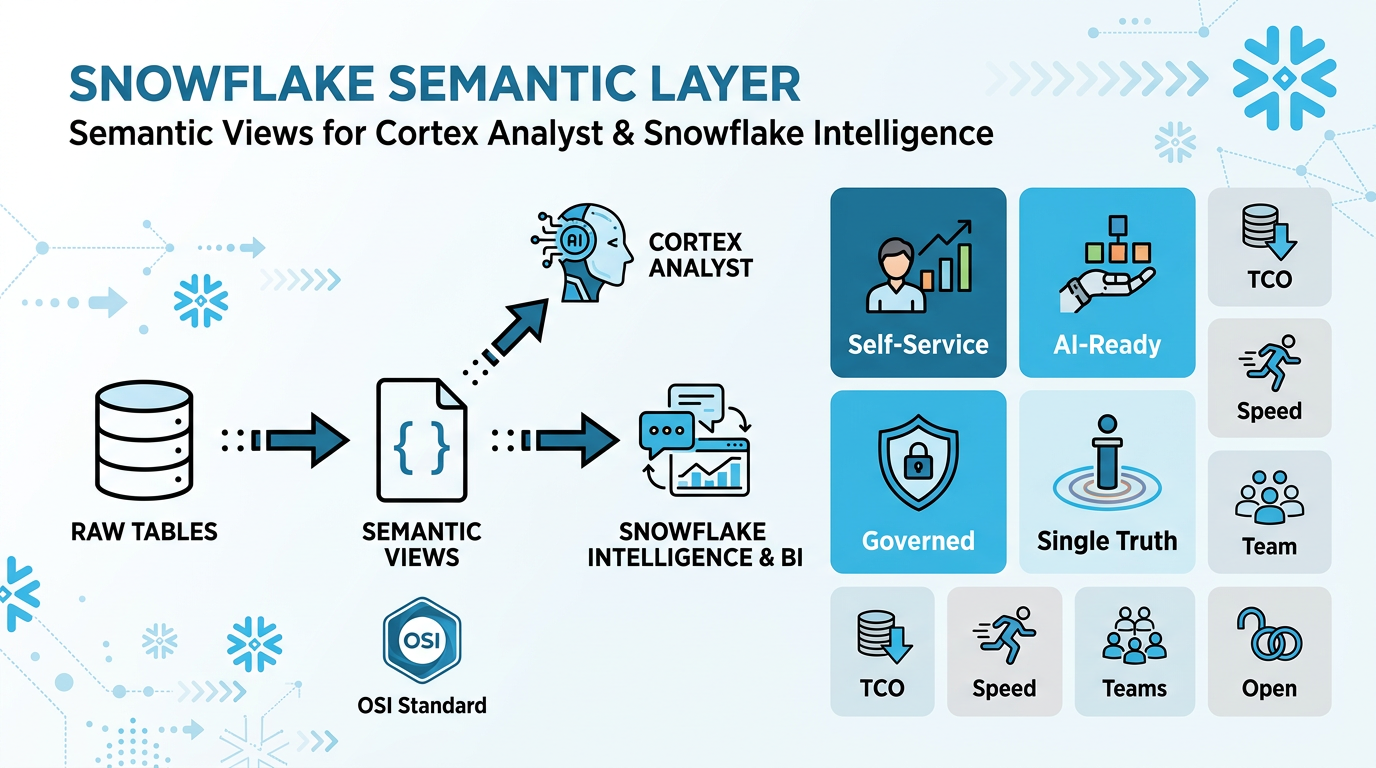
The Semantic Layer for Cortex Analyst & Snowflake Intelligence
A Semantic View is a YAML-based metadata layer that sits between your raw Snowflake tables and Cortex Analyst — Snowflake's natural-language-to-SQL engine that powers Snowflake Intelligence.
How They Work Together
Semantic views fix the mismatch between how business users describe data ("revenue by region") and how it's actually stored in database schemas (`TBL_SALES.AMT_TOTAL`). They define the business meaning of your data by providing:
- Business context — Descriptions that explain what each table and column represents in business terms
- Relationships — How tables connect to each other through joins
- Metrics — Pre-defined calculations like
Net Revenue = SUM(gross_revenue * (1 - discount)) - Filters — Common data slices like "active customers" or "last quarter"
- Examples — Sample question-answer pairs (Verified Queries) that guide the AI
Cortex Analyst uses these semantic views to generate accurate SQL from natural language questions. Instead of guessing column names and join paths, it understands your business concepts and generates reliable queries.
Snowflake Intelligence brings it all together: a Cortex Agent orchestrates multiple tools (Cortex Analyst for structured data, Cortex Search for documents, custom tools) to deliver end-to-end natural-language analytics inside Snowflake.
Key Benefits & Added Value
🎯 Self-Service Analytics for Everyone
Business users query data in natural language without SQL knowledge or understanding complex schemas. Break down technical barriers and empower true self-service.
🤖 Foundation for AI & Agentic Analytics
Semantic views provide the business context LLMs need to answer real-world questions reliably. Essential for Cortex Analyst and Snowflake Intelligence to generate accurate SQL.
🎓 Single Source of Truth
Define metrics and business rules once in Snowflake, reuse everywhere. Eliminate "multiple versions of truth" where revenue means different things in different reports.
🔒 Built-in Governance & Security
Native Snowflake objects inherit role-based access control, sharing, and lineage automatically. No separate semantic server to secure.
💰 Lower TCO vs External Semantic Layers
Avoid separate semantic servers, sync jobs, and duplicated logic. Change once in Snowflake, propagate everywhere—fewer moving parts, lower ops overhead.
🚀 Faster Time-to-Value
New BI tools and AI agents plug into existing semantic views immediately. Autopilot and visual editor accelerate modeling from raw data to business-ready.
🤝 Better Team Collaboration
Shared contract between business and data teams. Names, definitions, and relationships are explicit and documented in one place.
🔓 No Vendor Lock-In
BI-tool agnostic—works with Sigma, Omni, Honeydew, Power BI, and more. Standardize semantics without locking into a single tool.
Why YAML, Not SQL DDL?
Semantic views use YAML because it supports features that SQL DDL cannot express:
- Verified Queries (VQRs) — example question+SQL pairs for few-shot learning
- Sample values — representative data values for filter generation
- Custom instructions — natural language guidance for the LLM
- Rich descriptions — business context for every column and table
- Metrics — pre-defined aggregation logic (SUM, COUNT, AVG)
- Named filters — reusable WHERE clause patterns
YAML format also enables version control via Git CI/CD pipelines, making it easy to track changes and collaborate across teams.
Using the semantic-view Skill in Cortex Code
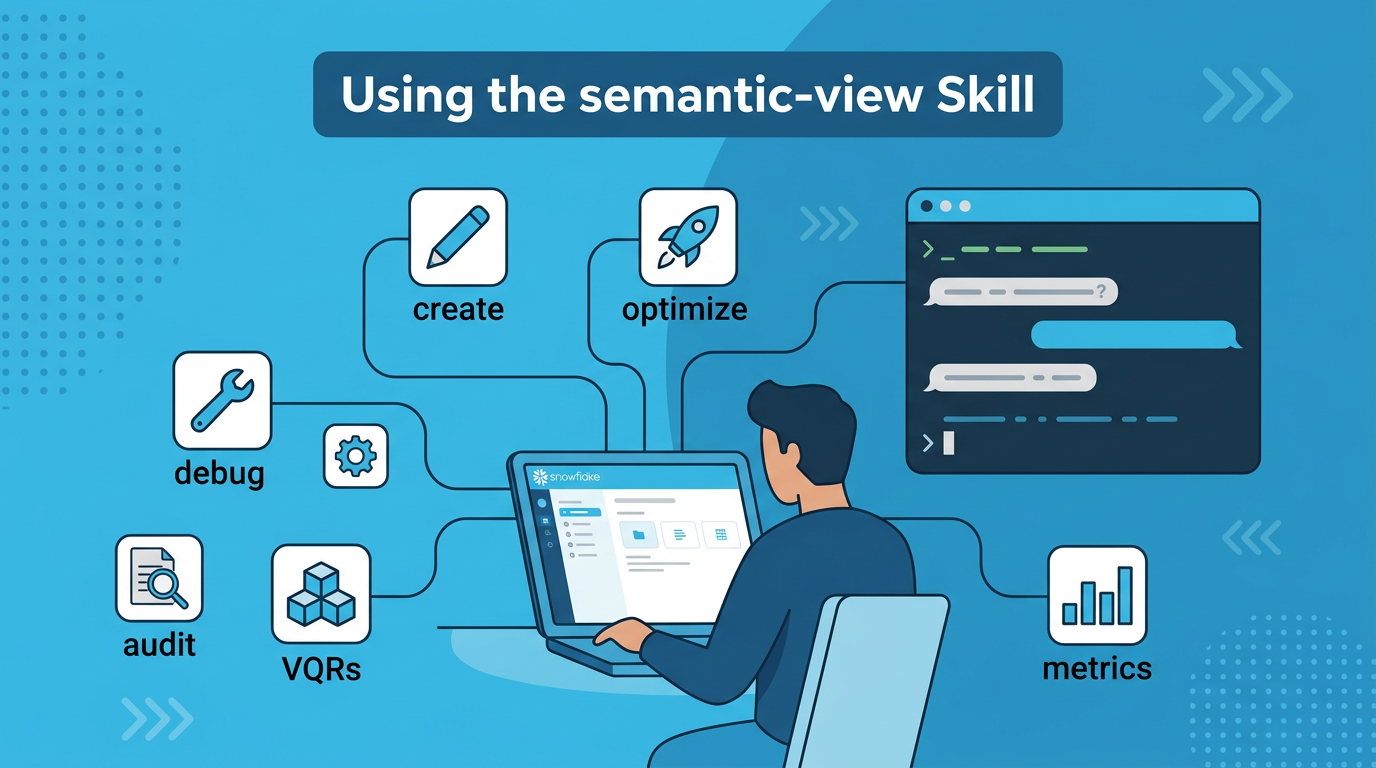
What Is the semantic-view Skill?
The semantic-view skill is a bundled skill available in both Cortex Code environments:
- Cortex Code in Snowsight — AI assistant integrated directly into the Snowflake web UI
- Cortex Code CLI — Command-line AI assistant for local development workflows
It is the single entry point for all semantic view operations — creation, optimization, auditing, debugging, VQR generation, and more. Every best practice described in this guide is implemented as a workflow inside this skill.
Getting Started with Cortex Code
📱 Cortex Code in Snowsight
Use Cortex Code directly in your browser within Snowflake's web UI. No installation required.
📚 Documentation:
Snowflake Docs - Cortex Code in Snowsight
💻 Cortex Code CLI
Install the command-line version for terminal-based workflows and local development.
📚 Documentation:
Snowflake Docs - Cortex Code CLI
How to Invoke the Skill
Simply describe what you want in natural language. The skill triggers automatically on keywords like create, optimize, debug, audit, improve, suggest VQRs, suggest metrics, or import Tableau.
Example prompts (works in both Snowsight and CLI)# Create a new semantic view "Create a semantic view for our sales tables in ANALYTICS_DB.SEMANTIC_MODELS" # Optimize an existing one "Optimize the semantic view PROD_DB.MODELS.SALES_SV" # Debug SQL generation issues "Debug why 'top 10 customers by revenue' generates wrong SQL on MY_DB.SCHEMA.MY_VIEW" # Run a best practices audit "Audit ANALYTICS_DB.MODELS.FINANCE_SV for best practices" # Generate VQR suggestions from usage history "Suggest VQRs for PROD_DB.MODELS.SALES_SV" # Suggest metrics and filters from query history "Suggest metrics and filters for PROD_DB.MODELS.SALES_SV" # Import a Tableau workbook "Import the Tableau workbook at @MY_STAGE/dashboard.twbx as a semantic view"
Skill Workflow Routing
After initialization, the skill automatically routes to the right workflow based on your intent:
| Intent | Workflow | What Happens |
|---|---|---|
| Create new SV | Creation Mode | FastGen API generates YAML from your tables and SQL queries, then validates |
| Import Tableau file | Tableau Import | Analyzes .twb/.twbx/.tds/.tdsx, exports to semantic view YAML |
| Audit / check quality | Audit Mode | VQR testing, best practices verification, inconsistency & duplicate detection |
| Fix SQL generation | Debug Mode | Diagnosis → Root Cause Analysis → Apply targeted optimizations |
| Suggest VQRs | VQR Suggestions | Mines CA request history + query history in parallel, returns ranked suggestions |
| Suggest metrics / filters | Filters & Metrics Suggestions | Uses SYSTEM$CORTEX_ANALYST_SVA_TOOL to suggest metrics, filters, and computed facts from real usage |
Prerequisites
- Cortex Code CLI installed and connected to Snowflake
- Fully qualified semantic view name for existing views:
DATABASE.SCHEMA.VIEW_NAME - Python managed via
uv— the skill usesuv run pythonfor all scripts - Dependencies:
tomli,urllib3,requests,pyyaml,snowflake-connector-python(auto-managed byuv)
Skill Capabilities at a Glance
YAML Anatomy — Structure of a Semantic View
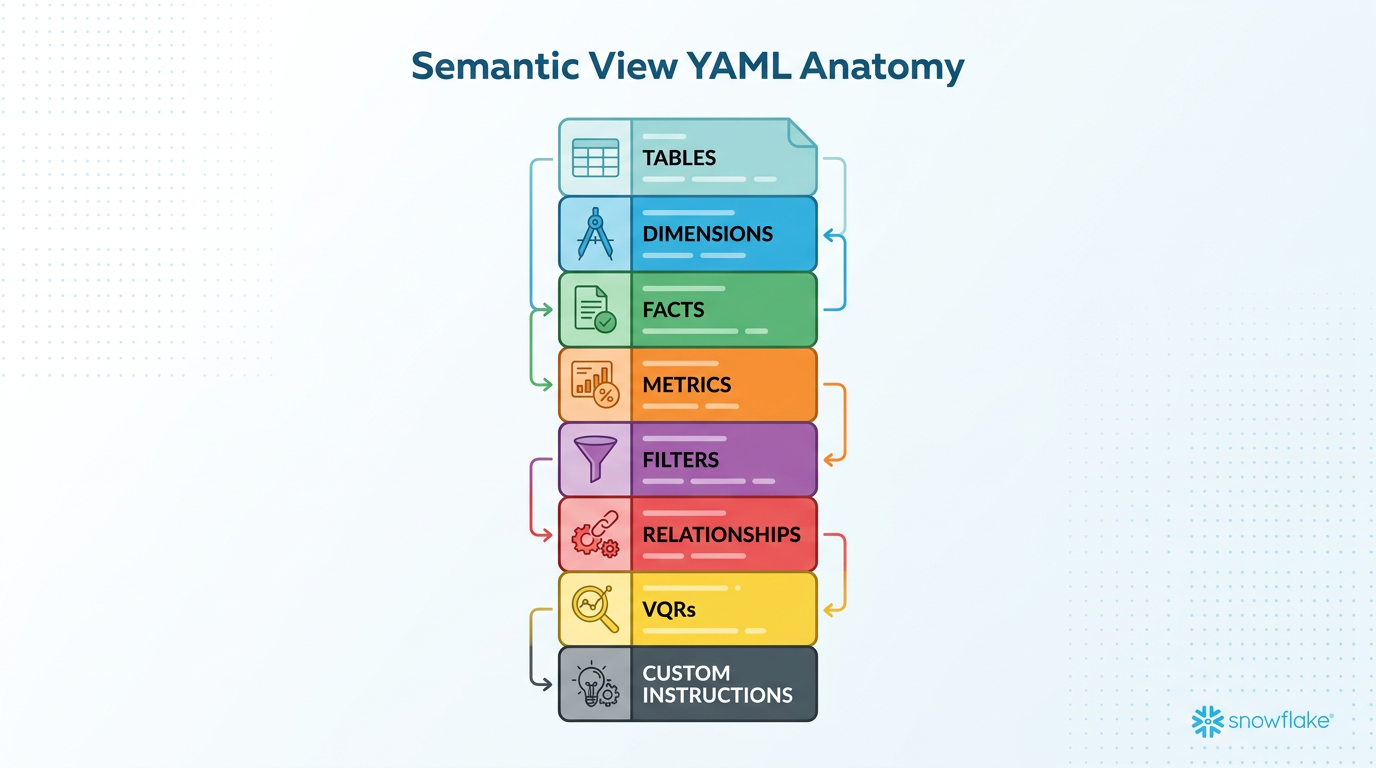
Complete YAML Skeleton
Every semantic view follows this structure. Elements are categorized as Physical (mapped to real columns) or Computed (added logic).
name: my_analytics_model
description: "Sales analytics for the North America region"

# ---- Tables ----
tables:
  - name: SALES                  # Logical name (for humans)
    description: "Daily sales transactions"
    base_table:
      database: PROD_DB
      schema: ANALYTICS
      table: TBL_SALES           # Physical table name

    # Physical columns (CANNOT add new ones)
    dimensions:                     # Physical categorical
      - name: REGION
        description: "Sales region (NA, EMEA, APAC)"
        expr: region
        data_type: TEXT
        sample_values: ["NA", "EMEA", "APAC"]

    time_dimensions:                # Physical date/time
      - name: SALE_DATE
        description: "Date the transaction occurred"
        expr: sale_date
        data_type: DATE

    facts:                          # Physical numeric
      - name: REVENUE
        description: "Transaction revenue in USD"
        expr: revenue_usd
        data_type: NUMBER

    # Computed elements (CAN add new ones)
    metrics:                        # Computed aggregations
      - name: TOTAL_REVENUE
        description: "Sum of all revenue"
        expr: SUM(revenue_usd)
        access_modifier: public_access

    filters:                        # Computed WHERE clauses
      - name: LAST_30_DAYS
        description: "Records from the last 30 days"
        expr: sale_date >= DATEADD(day, -30, CURRENT_DATE())

# ---- Relationships ----
relationships:                      # Computed joins
  - name: sales_to_customers
    left_table: SALES
    right_table: CUSTOMERS
    relationship_columns:
      - left_column: CUSTOMER_ID
        right_column: CUSTOMER_ID
    relationship_type: many_to_one
    join_type: left_outer

# ---- Verified Queries ----
verified_queries:
  - name: vqr_0
    question: "What is the total revenue by region?"
    sql: |
      SELECT region, SUM(revenue_usd) AS total_revenue
      FROM prod_db.analytics.tbl_sales
      GROUP BY region ORDER BY total_revenue DESC

# ---- Custom Instructions ----
module_custom_instructions:         # Computed LLM guidance
  sql_generation: |
    Use table aliases for readability.
  question_categorization: |
    Treat trend questions as UNAMBIGUOUS_SQL.
Key Concepts — What You Can & Cannot Do
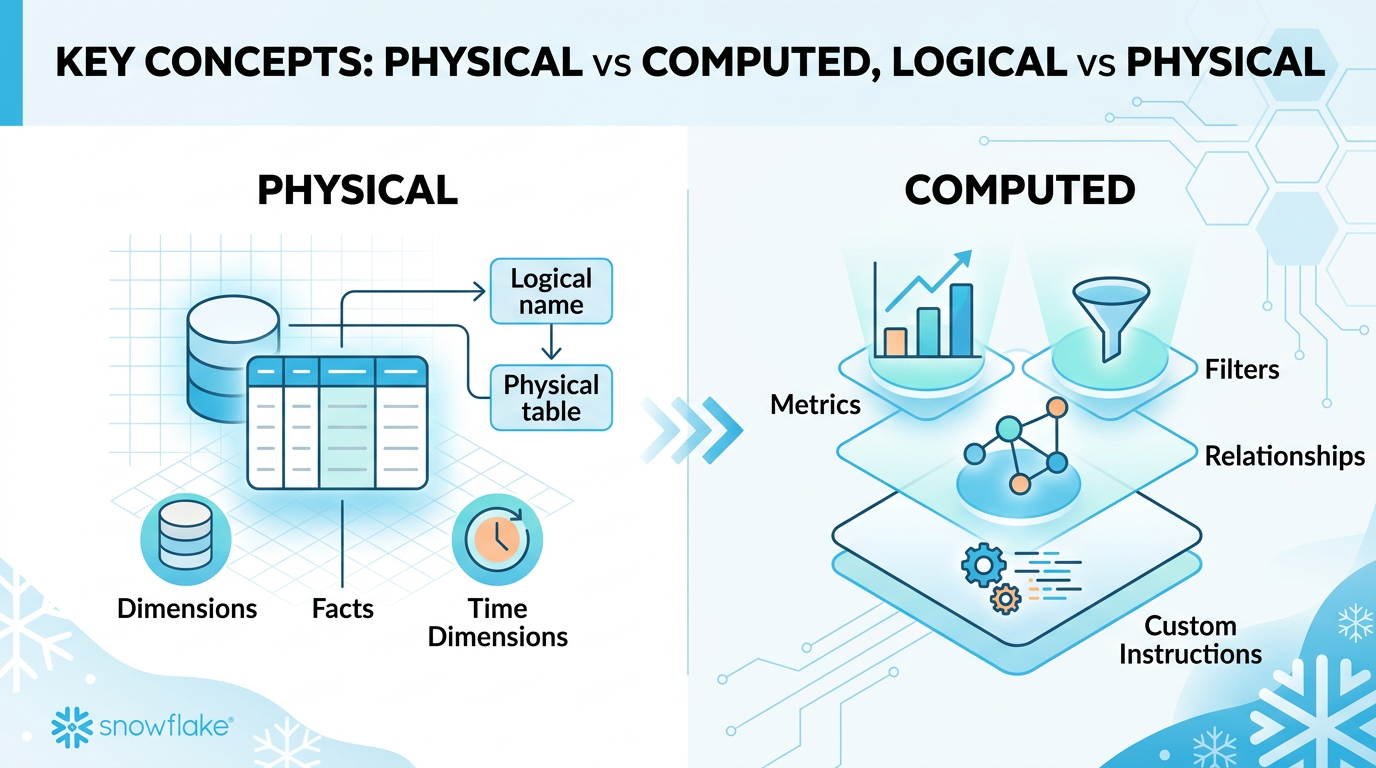
Physical vs Computed Elements
| Category | Elements | Can Add New? | Can Enhance? |
|---|---|---|---|
| Physical | Dimensions, Facts, Time Dimensions | No — mapped to real columns | Yes — descriptions, synonyms, sample_values |
| Computed | Metrics, Filters, Relationships, Custom Instructions | Yes | Yes |
Logical vs Physical Table Names
tables:
  - name: SALES_FACT   # Logical
    base_table:
      table: TBL_SALES  # Physical
SELECT * FROM prod.sales.tbl_sales
-- Uses physical name. This is CORRECT!
base_table references, never logical names. This is expected and correct behavior.
Deprecated Fields — Never Use These
| Deprecated Field | Replacement | Reason |
|---|---|---|
measures | facts | Renamed in current spec |
default_aggregation | Use metrics | Deprecated from proto |
one_to_many | many_to_one (swap tables) | Deprecated relationship type |
many_to_many | Not supported | Requires PK on at least one side |
full_outer / cross / right_outer | inner or left_outer | Deprecated join types |
Creation Workflow
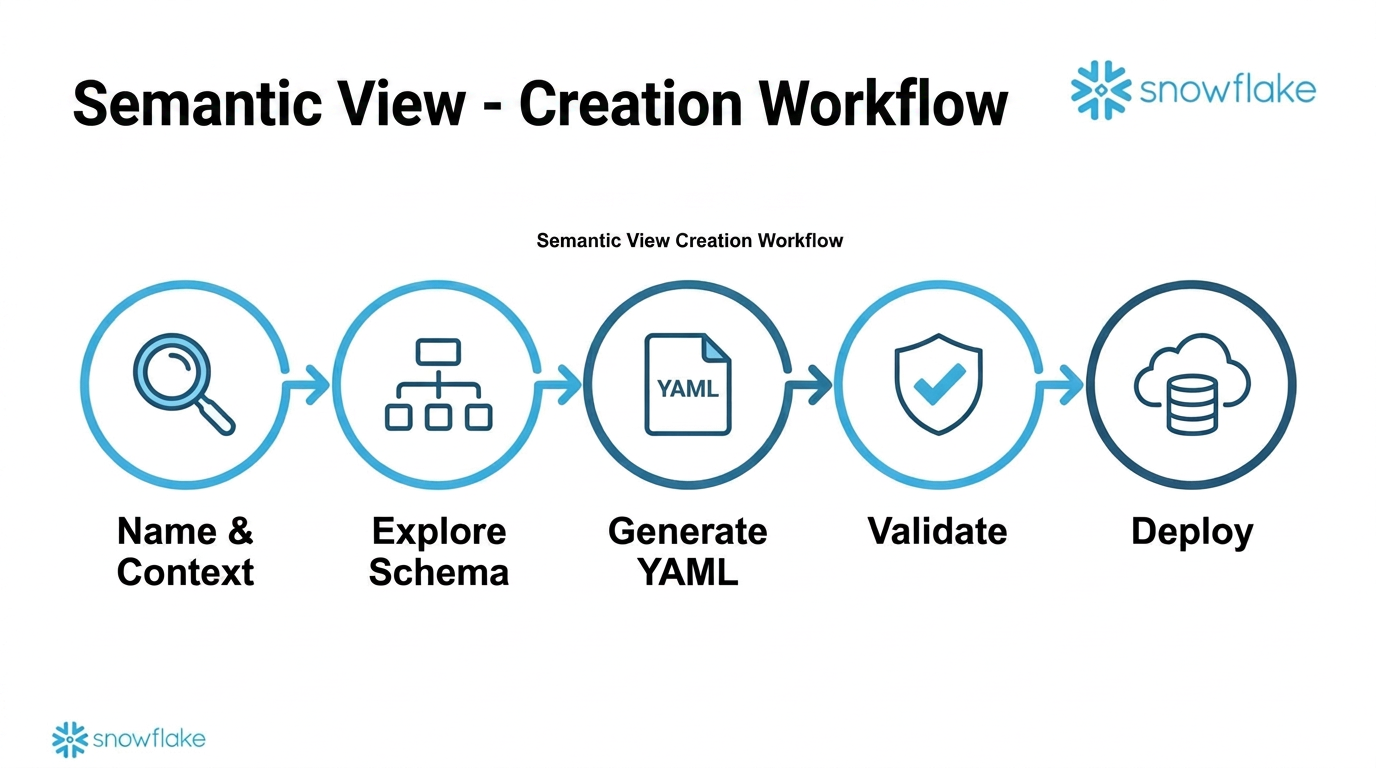
Step-by-Step Process
Context Gathering (Step 1)
- Name: simple identifier or FQN (
DATABASE.SCHEMA.NAME) - Target: database + schema for the semantic view
- Context: SQL queries, table references, and business context — all in one request
Two Creation Paths
Extracts metadata, infers PKs and relationships, generates dimensions/facts/metrics/VQRs automatically. Recommended for most use cases.
Hand-craft the YAML using
DESCRIBE TABLE results and business knowledge. Fallback when FastGen fails.
Deployment Options
Option 1: Database Object (Recommended)
CALL SYSTEM$CREATE_SEMANTIC_VIEW_FROM_YAML(
  'DATABASE.SCHEMA',
  '<yaml_content>',
  FALSE  -- FALSE = create
);
Creates a managed Snowflake object. No stage needed.
Option 2: Stage Upload
CREATE STAGE IF NOT EXISTS my_stage;
PUT file://model.yaml @my_stage/;
Reference via stage path: @my_stage/model.yaml
Validation — Always Validate Before Deploying
-- In Cortex Code:
reflect_semantic_model(semantic_model_file="path/to/model.yaml")

-- Via SQL (validate only, don't create):
CALL SYSTEM$CREATE_SEMANTIC_VIEW_FROM_YAML(
  'DB.SCHEMA', '<yaml>', TRUE  -- TRUE = validate only
);
Sizing & Architecture
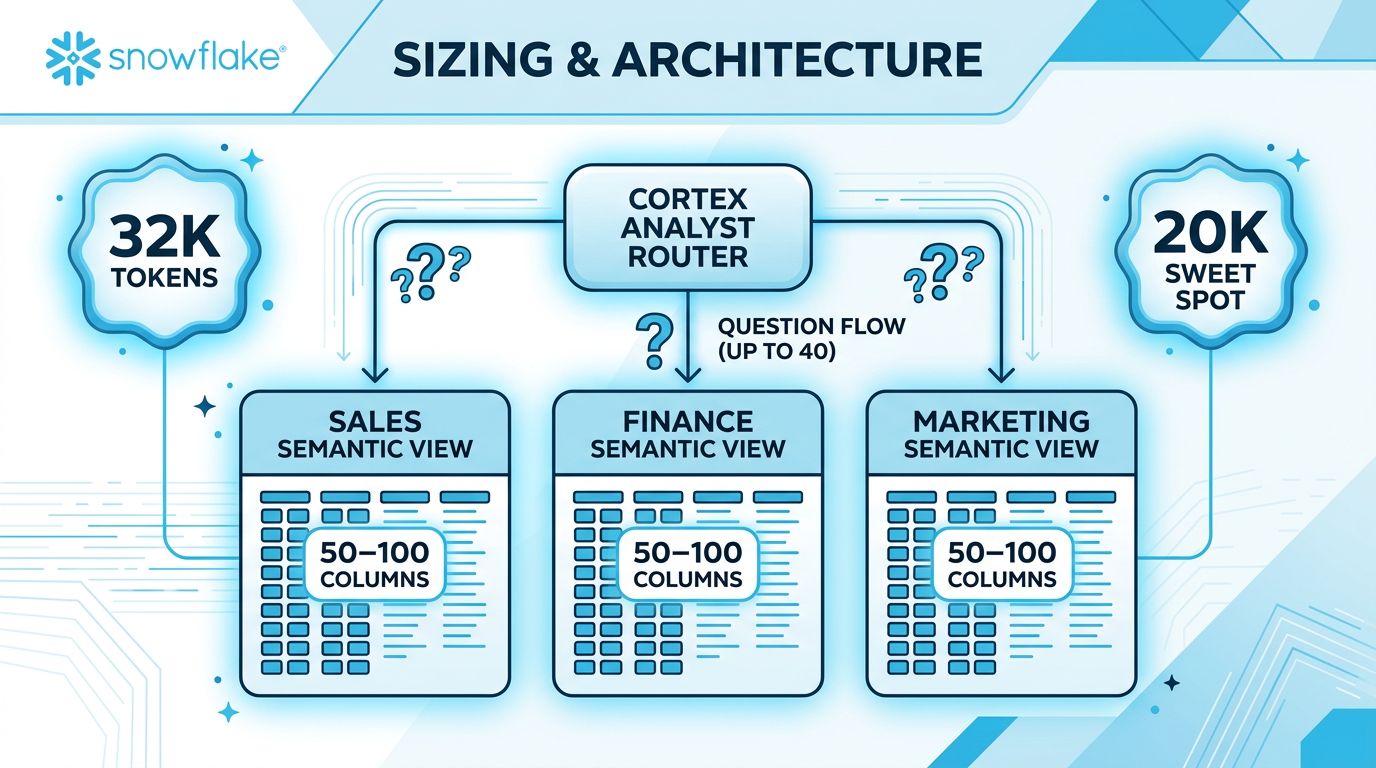
Size Limits
Domain-Based Splitting
When a single semantic view grows too large, split by business domain:
- One SV per business domain (Sales, Finance, Marketing, etc.)
- 50-100 columns each — focused on domain-specific questions
- Duplicate shared dimensions (e.g.,
date,region) across SVs - Use Cortex Analyst routing to direct questions to the right SV (up to 40 SVs)
Descriptions & Metadata — The Biggest Accuracy Lever
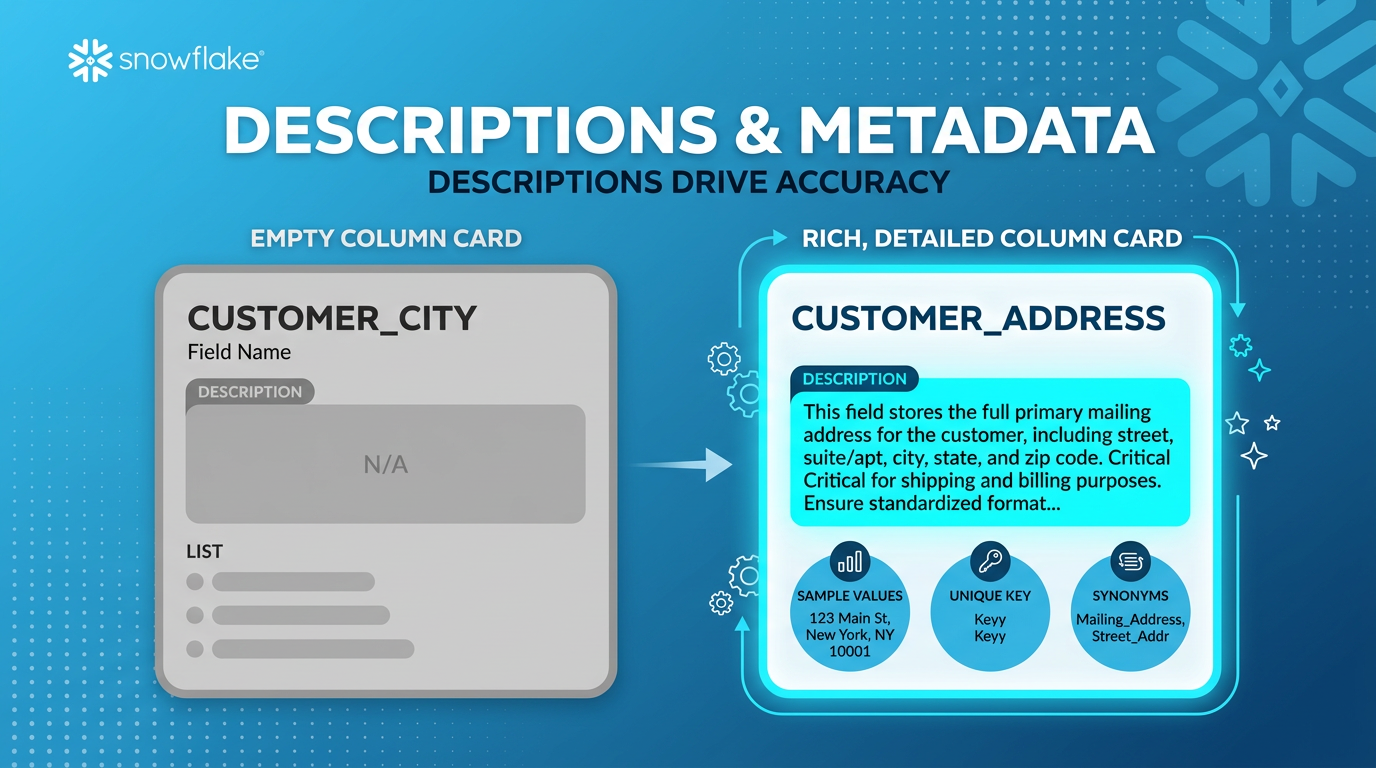
Descriptions Have the Biggest Impact
Rich, contextual descriptions are the single most impactful thing you can do for accuracy. They outperform synonyms for English-language environments.
- name: ACCOUNT_ID
  description: "Account ID"
  expr: account_id
  data_type: NUMBER
Minimal — just repeats the column name. Gives the LLM nothing to work with.
- name: ACCOUNT_ID
  description: "Unique identifier for
    Snowflake accounts. Used to
    track usage and link with
    customer information."
  expr: account_id
  data_type: NUMBER
  unique: true
Rich context: what it is, how it's used, business relationships. Plus unique: true to prevent unnecessary DISTINCT.
Description Best Practices
Every description should cover:
- What the column represents
- How it's commonly used in queries
- Relationships to other data (foreign keys, hierarchies)
- Business context (what domain it belongs to)
Sample Values & Cortex Search
| Distinct Values | Approach | Example |
|---|---|---|
| Fewer than 10 | Use sample_values |
sample_values: ["NA", "EMEA", "APAC"] |
| More than 10 | Use Cortex Search | Auto-updating, low cost, scales to thousands |
sample_values to help the LLM generate correct filter values.
Enhancement Strategies
| Enhancement | When to Use | Impact |
|---|---|---|
| Descriptions | Always — every column and table | Highest impact |
| Sample values | Categorical columns with few values | High — better filter generation |
| Unique flag | Primary key columns | Medium — prevents unnecessary DISTINCT |
| Synonyms | Non-English environments or strong aliases | Lower — descriptions are usually enough |
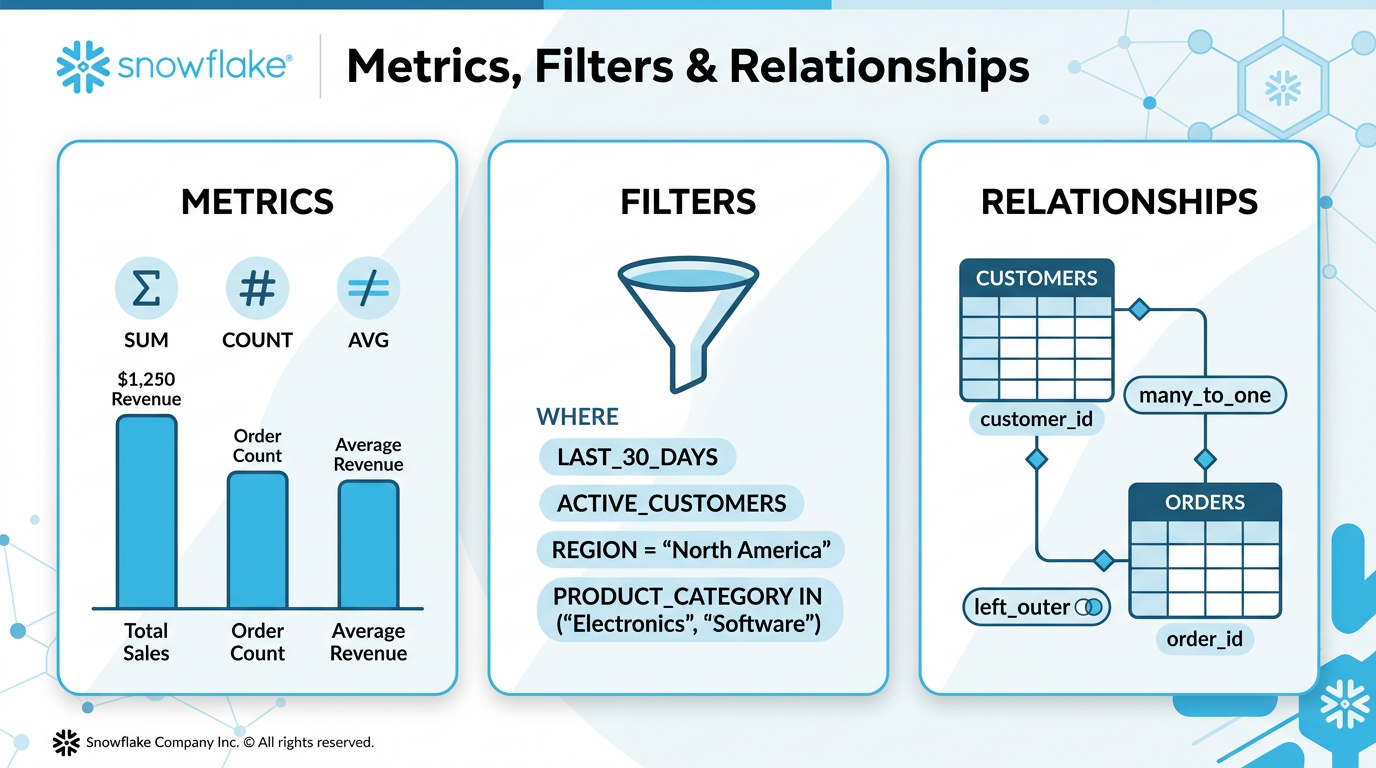
Metrics, Filters & Relationships
Optimization Priority
When fixing SQL generation issues, apply fixes in this order:
- Enhance Dimensions & Facts
Improve descriptions, add synonyms, sample_values. Lowest risk, highest impact. - Add Metrics
Define common aggregations (SUM, COUNT, AVG) to prevent wrong aggregation logic. - Add Filters
Named WHERE clauses for business logic (active customers, last 30 days, etc.). - Add/Fix Relationships
Table joins. Requires primary key on at least one side. - Custom Instructions
Last resort. Only when semantic model elements cannot express the logic.
Metrics
Facts are raw numeric columns. Metrics are computed aggregations you can add.
metrics:
  - name: TOTAL_REVENUE
    description: "Sum of all order amounts"
    expr: SUM(order_amount)
    access_modifier: public_access

  - name: UNIQUE_CUSTOMERS
    description: "Count of distinct customers"
    expr: COUNT(DISTINCT customer_id)
    access_modifier: public_access

  - name: AVG_ORDER_VALUE
    description: "Average value across all orders"
    expr: AVG(order_amount)
    access_modifier: public_access
access_modifier: public_access. Missing it is a common error.
Filters
Named WHERE clauses that must be nested under the table they apply to.
tables:
  - name: CUSTOMERS
    filters:
      - name: ACTIVE_CUSTOMERS
        description: "Customers with active status and recent purchases"
        expr: status = 'ACTIVE' AND last_purchase_date >= DATEADD(month, -6, CURRENT_DATE())

      - name: LAST_30_DAYS
        description: "Records from the last 30 days"
        expr: created_date >= DATEADD(day, -30, CURRENT_DATE())
Filters nested under tables
Simple WHERE-style expressions
Clear descriptions of when to use
Filters at the top level
HAVING clauses (use metrics instead)
Aggregation-dependent filters
Relationships (Joins)
| Property | Allowed Values | Notes |
|---|---|---|
relationship_type | one_to_one, many_to_one | Must have PK on at least one side |
join_type | inner, left_outer | Use left_outer unless reference data must exist |
relationships:
  - name: orders_to_customers
    left_table: ORDERS
    right_table: CUSTOMERS
    relationship_columns:
      - left_column: CUSTOMER_ID
        right_column: CUSTOMER_ID
    relationship_type: many_to_one
    join_type: left_outer
infer_primary_keys.py (95% uniqueness threshold) before adding relationships.
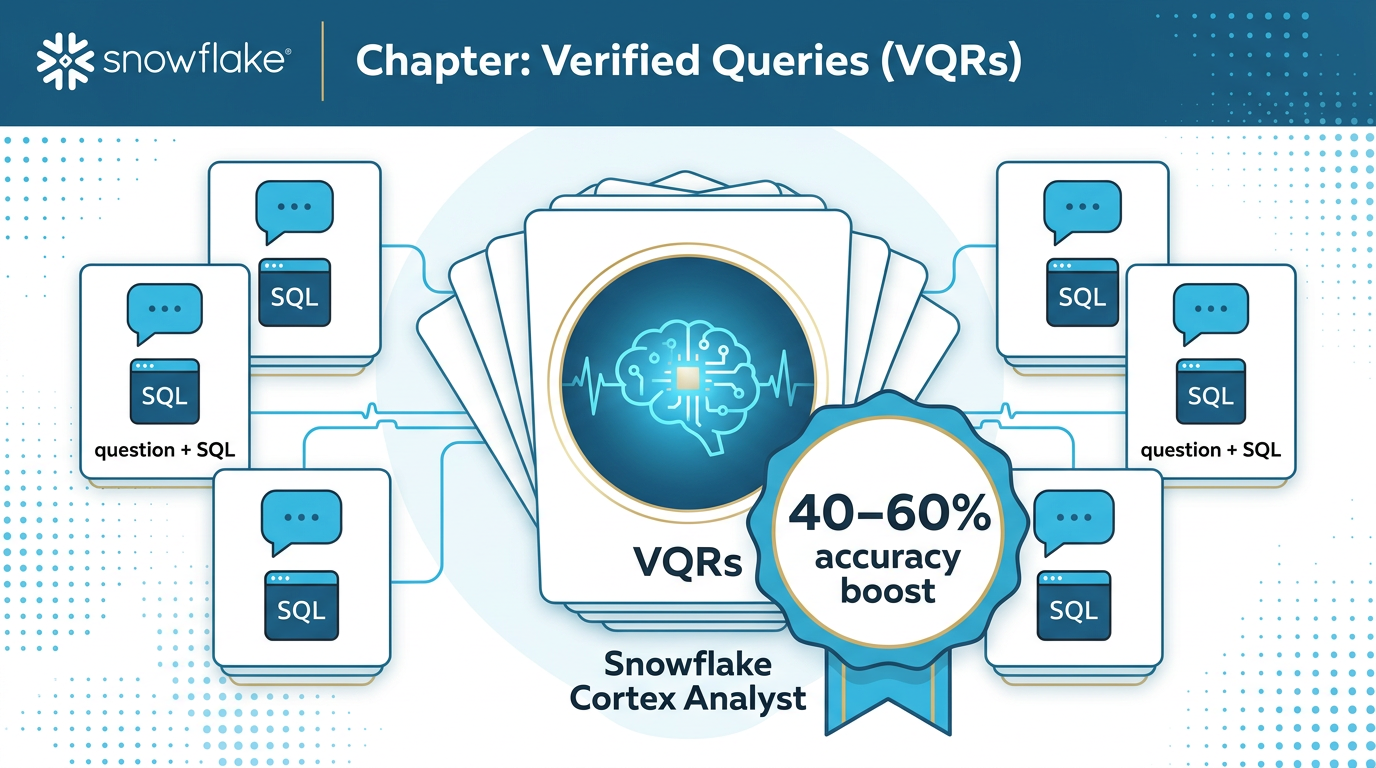
Verified Queries (VQRs) — 40-60% Accuracy Boost
What Are VQRs?
Verified Query Results are question + SQL pairs that serve as few-shot examples for Cortex Analyst. When a user asks a question, the system finds the most similar VQR via cosine similarity and uses it as a template.
VQR Format & Naming
verified_queries:
  - name: vqr_0                            # Sequential: vqr_0, vqr_1, ...
    question: "What are the daily active users?"  # Natural language
    sql: |                                      # Pipe syntax for multi-line
      SELECT
        DATE_TRUNC('day', logged_at)::date AS ds,
        COUNT(DISTINCT user_id) AS active_users
      FROM analytics.logs.usage_logs
      WHERE logged_at >= '2024-01-01'
      GROUP BY ds
      ORDER BY ds

  - name: vqr_1
    question: "Top 10 customers by revenue?"
    sql: |
      SELECT customer_name, SUM(revenue) AS total_revenue
      FROM sales.transactions
      GROUP BY customer_name
      ORDER BY total_revenue DESC
      LIMIT 10
VQR Best Practices
- Use sequential naming:
vqr_0,vqr_1, ... - Use pipe syntax
|for multi-line SQL - Write natural language questions
- Reserve for complex/ambiguous cases
- Include complete, valid SQL
- Use physical table references in SQL
- Duplicate similar questions
- Use inline SQL (escaping issues)
- Write SQL that references logical table names
- Add VQRs for trivially simple queries
- Include VQRs with broken SQL
- Skip testing VQRs before deployment
semantic-view skill's VQR Suggestions workflow. It runs both ca_requests_based and query_history_based modes in parallel.
Custom Instructions — Last Resort
When to Use Custom Instructions
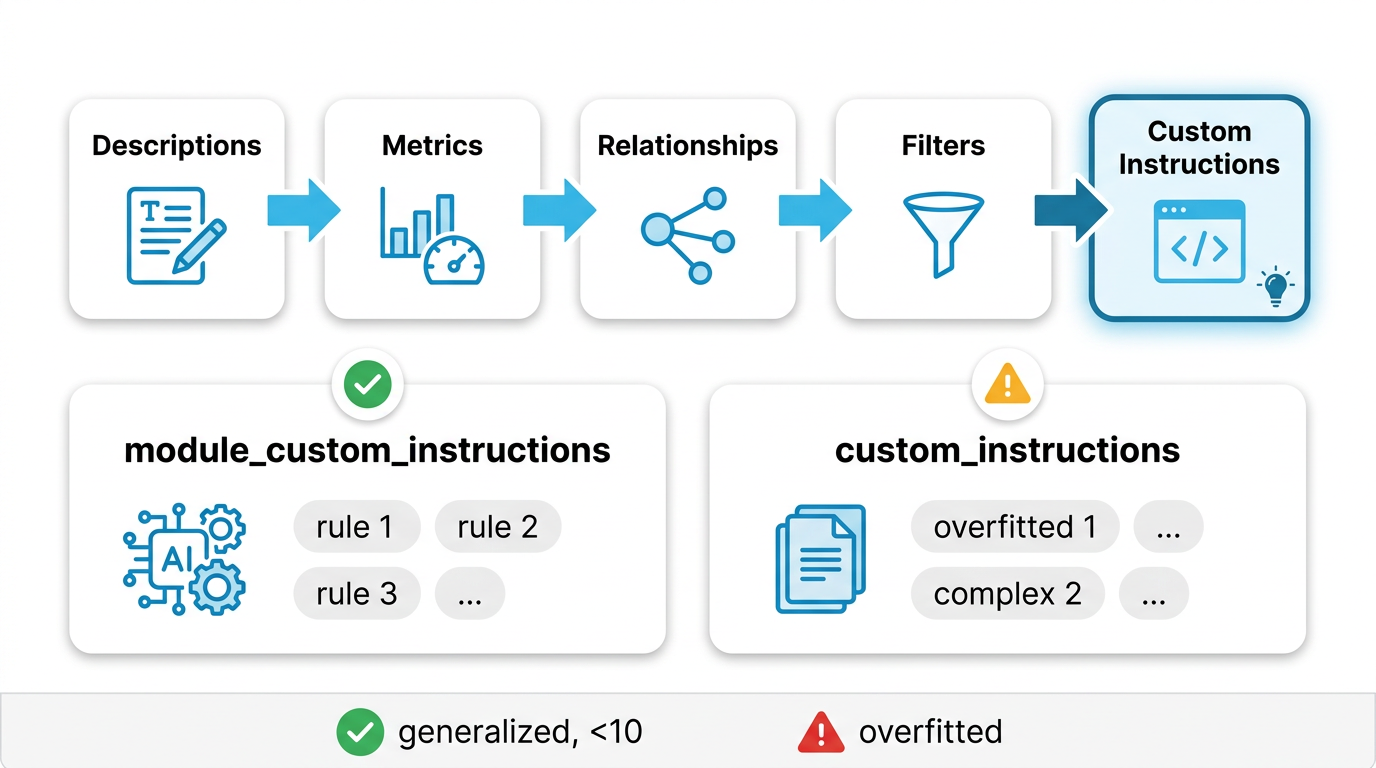
Custom instructions are natural language guidance for the LLM. Only use them after trying all other optimization levers:
Two Types
Recommended module_custom_instructions
Targeted guidance for specific pipeline components.
module_custom_instructions:
  sql_generation: |
    Use table aliases for readability.
    For fiscal quarters, add 11 months
    before extracting quarter.
  question_categorization: |
    Treat trend questions as
    UNAMBIGUOUS_SQL.
Legacy custom_instructions
General instructions for SQL generation.
custom_instructions: |-
  Unless explicitly asked for
  historical analysis, ALWAYS filter
  for snapshot_flag = 'Current'.

  "Biggest X" means frequency
  (COUNT), not value (SUM).
module_custom_instructions. If the SV already has custom_instructions, keep using that pattern for consistency.
Writing Good Instructions
"Biggest [dimension]" means most
frequent:
- GROUP BY dimension
- COUNT(DISTINCT primary_key)
- Filter out NULLs
Applies to any "biggest X" question.
For "Who are biggest partners?",
use COUNT(DISTINCT id)
GROUP BY partner.
Only works for one exact question.
Audit & Quality Assurance
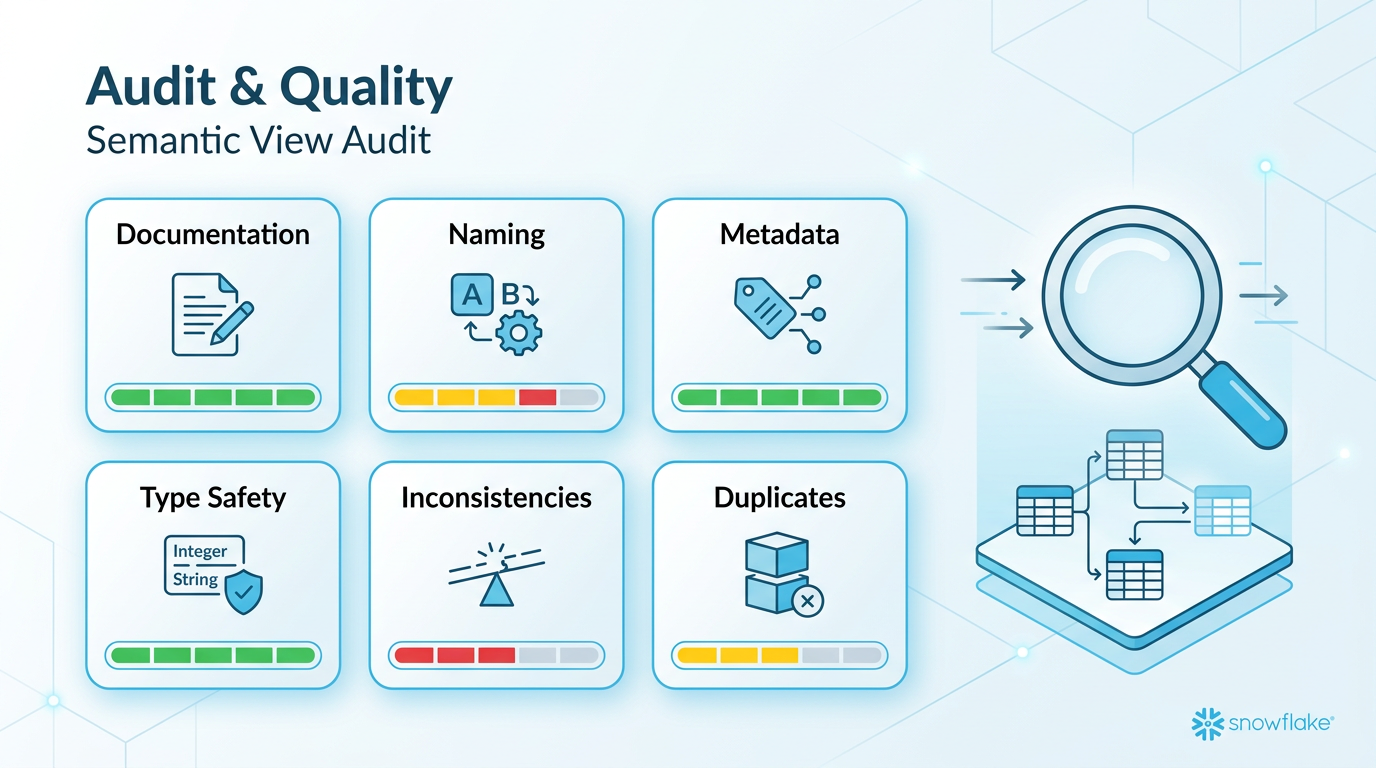
Three Audit Types
VQR Testing
Test each VQR without hints. Identifies which queries fail to measure completeness.
Best Practices
Documentation, naming, metadata, type safety, inconsistencies, duplicates, missing relationships.
Custom Criteria
User-defined validation rules for domain-specific requirements.
Best Practices Checks
| Check Category | What It Verifies | Severity |
|---|---|---|
| Documentation | All tables and columns have descriptions; quality/clarity | HIGH |
| Naming | No special characters; consistent conventions | MEDIUM |
| Metadata | Data types defined; synonyms used appropriately | MEDIUM |
| Type Safety | Correct dimension vs fact classification; time dimension types | HIGH |
Inconsistency Detection
| Type | Example | Severity |
|---|---|---|
| Conflicting descriptions | order_date described differently across tables |
MEDIUM |
| Data type mismatch | customer_id is NUMBER in one table, VARCHAR in another |
CRITICAL |
| Orphaned relationships | Relationship references non-existent table or column | CRITICAL |
| Circular dependencies | Table A → B → C → A | HIGH |
| Contradictory filters | Filter requires both status = 'active' AND status = 'inactive' |
CRITICAL |
Duplicate Detection
Identifies when custom instructions redundantly repeat information already in model elements:
| Duplicate Type | Match Level | Resolution |
|---|---|---|
| Exact duplicate | 100% | Remove from instructions |
| High similarity | >85% | Remove from instructions |
| Partial overlap | 50-85% | Review and consolidate |
Missing Relationships Thresholds
| Tables in SV | Minimum Expected Relationships | Flag If |
|---|---|---|
| 2-3 | 1 | 0 relationships |
| 4-6 | 2 | 1 or fewer |
| 7+ | 3 | 2 or fewer |
Only flagged when multiple tables share FK-like columns or dimension tables have no relationships.
Debug Workflow — Fixing SQL Generation Issues
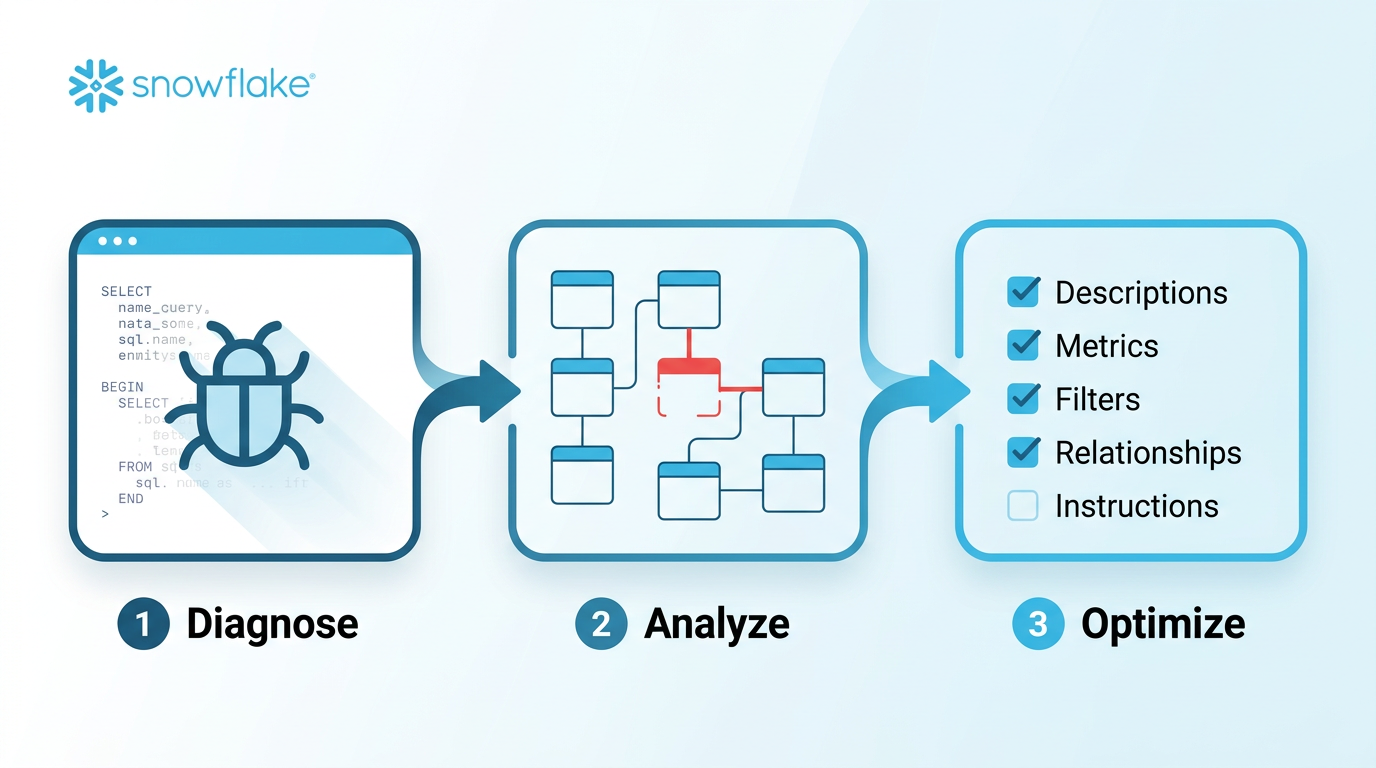
Three-Step Debug Process
Step 1: Diagnosis
- Get the problematic natural language question from the user
- Generate SQL using Cortex Analyst with the current semantic view
- Execute the SQL and present results
Step 2: Root Cause Analysis
- Compare generated SQL against expected output
- Identify gaps in the semantic model
- Present findings and recommended fixes
- Wait for user approval before applying changes
Step 3: Apply Optimizations
- Apply approved fixes using the optimization priority order
- Validate with
reflect_semantic_model - Re-test the problematic question
- Exact match required — no "close enough"
Issue-to-Gap Mapping
| SQL Issue | Likely Semantic Model Gap | Fix Type |
|---|---|---|
| Missing or wrong column | Dimension/fact not properly described or missing synonyms | Enhance |
| Wrong aggregation | Missing metric definition or unclear fact descriptions | Add Metric |
| Missing JOIN | Missing relationship between tables | Add Relationship |
| Incorrect filter | Missing named filter or unclear dimension values | Add Filter |
| Wrong business logic | Complex rules not expressible via model elements | Custom Instruction |
Improvement & Optimization Loop
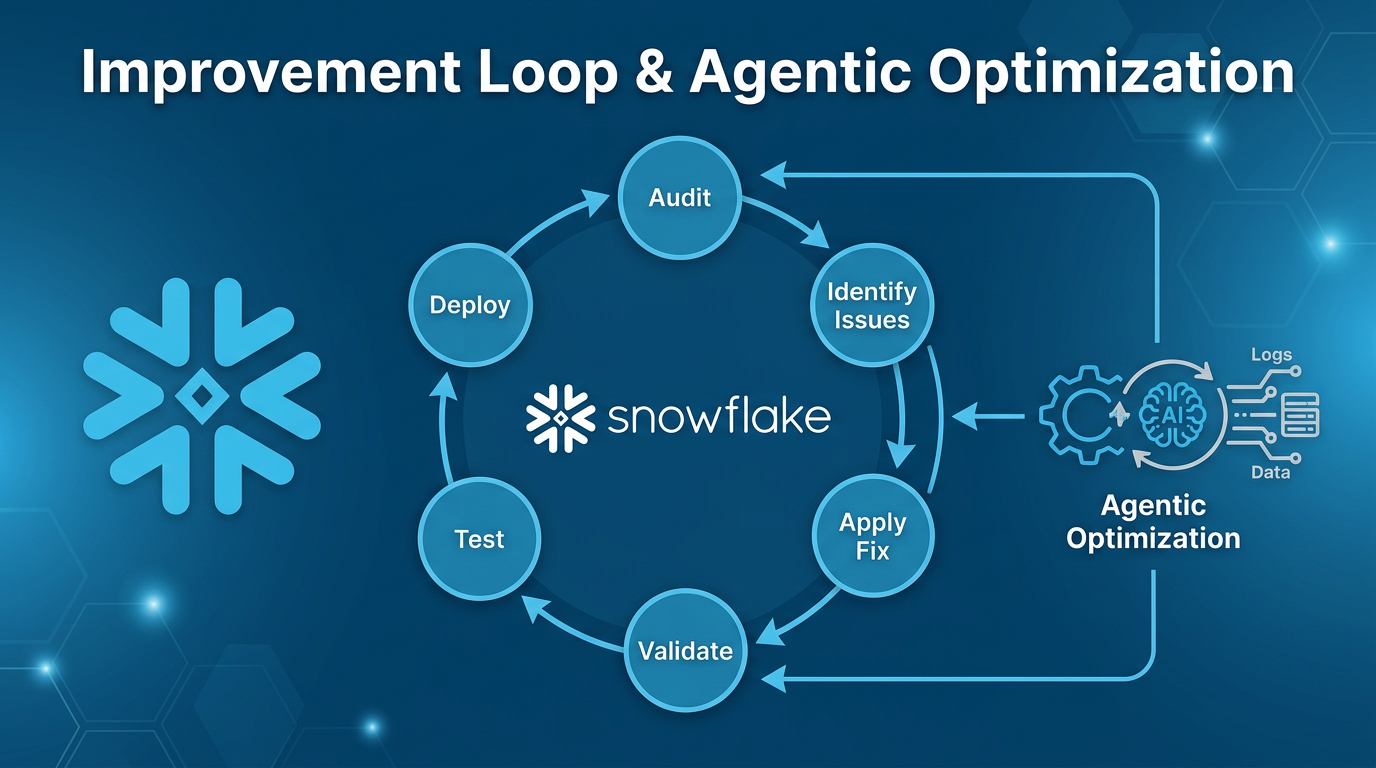
Three Improvement Approaches
VQR Suggestions
AI-generated verified query suggestions based on usage patterns. Modes: ca_requests_based or query_history_based.
Agentic Optimization
Automated AI analysis. Runs async (minutes). Suggests VQRs, descriptions, and structural changes.
Manual Evaluation
Test existing VQRs, identify failures, fix iteratively with the debug workflow.
Agentic Optimization Workflow
SQL Commands for Agentic Optimization
-- Start optimization
CALL SYSTEM$CORTEX_ANALYST_CREATE_AGENTIC_OPTIMIZATION('{
  "semantic_model": {
    "semantic_view": "DB.SCHEMA.VIEW_NAME"
  },
  "warehouse": "MY_WH",
  "experimental": "{}"
}');

-- Check status
CALL SYSTEM$CORTEX_ANALYST_GET_AGENTIC_OPTIMIZATION('<optimization_name>');

-- List all optimizations
CALL SYSTEM$CORTEX_ANALYST_LIST_AGENTIC_OPTIMIZATIONS('{
  "semantic_model": {
    "semantic_view": "DB.SCHEMA.VIEW_NAME"
  },
  "experimental": "{}"
}');

-- Cancel if needed
CALL SYSTEM$CORTEX_ANALYST_CANCEL_AGENTIC_OPTIMIZATION('<optimization_name>');
Iterative Improvement Cycle
Re-Deployment After Changes
If the semantic view was exported from a database object, re-deploy after making changes:
-- Export current definition
SELECT SYSTEM$READ_YAML_FROM_SEMANTIC_VIEW('DB.SCHEMA.VIEW_NAME');

-- After editing locally, re-deploy
CALL SYSTEM$CREATE_SEMANTIC_VIEW_FROM_YAML(
  'DB.SCHEMA',
  '<updated_yaml_content>',
  FALSE
);
Common Pitfalls & Anti-Patterns
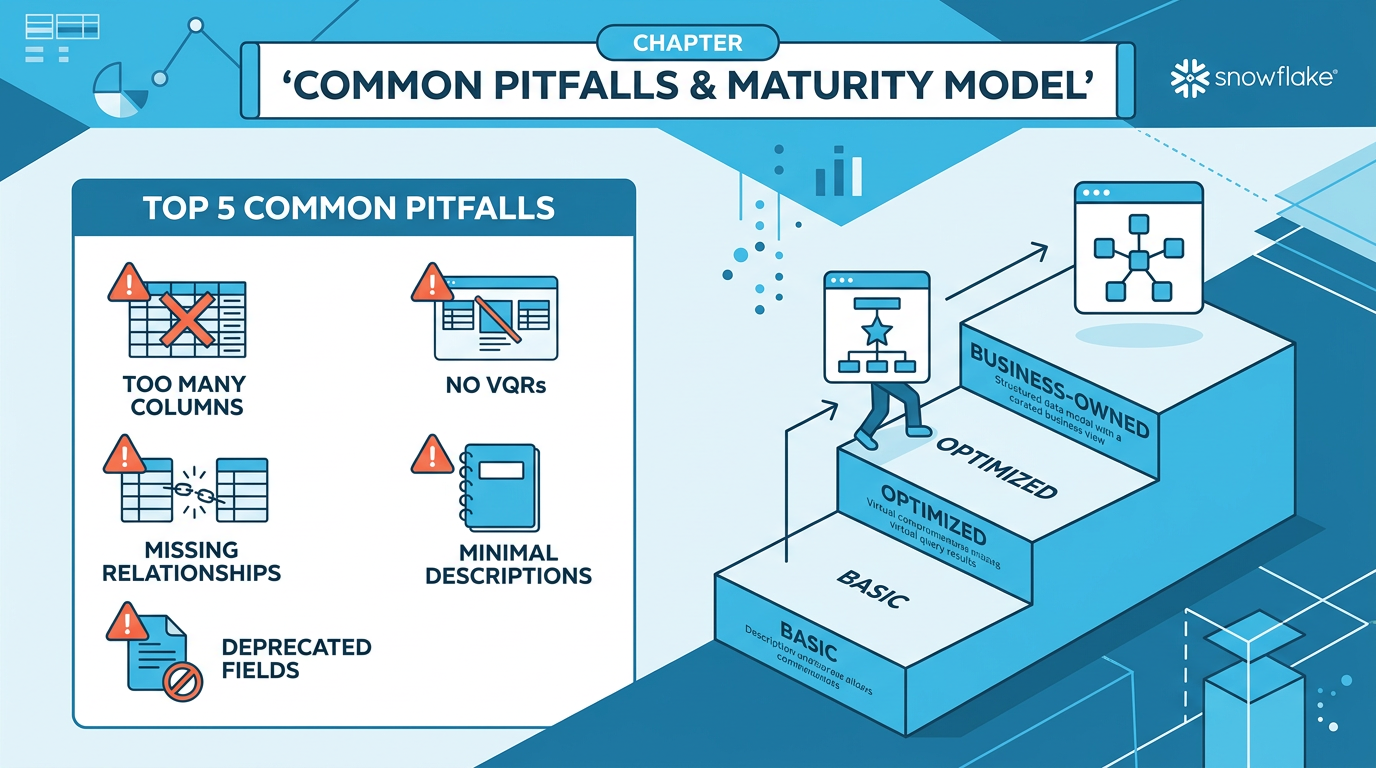
Top 10 Mistakes to Avoid
| # | Pitfall | Impact | Fix |
|---|---|---|---|
| 1 | Too many columns (>100) | Performance degrades, token limit exceeded | Split by domain, keep 50-100 per SV |
| 2 | No VQRs | Missing 40-60% accuracy gain | Add VQRs for complex/ambiguous questions |
| 3 | Missing relationships in multi-table SVs | JOINs not generated, data incomplete | Add relationships with verified PKs |
| 4 | Duplicate instructions | Confusion, conflicting guidance, wasted tokens | Keep info in its natural location; audit for dupes |
| 5 | Deprecated fields (measures, default_aggregation) |
Validation errors or silent failures | Use facts and metrics instead |
| 6 | Minimal descriptions | LLM can't understand column purpose | Write rich descriptions with business context |
| 7 | Custom instructions as first resort | Brittle, hard to maintain, limited to ~10 | Follow priority order: descriptions → metrics → filters → relationships → instructions |
| 8 | NOT IN conditions in generated SQL | Unexpected NULL handling | Use explicit filters or custom instructions to guide SQL patterns |
| 9 | No testing before deployment | Broken queries in production | Always validate + run VQR testing audit |
| 10 | Timestamp filtering bugs | Wrong date ranges in results | Use explicit time_dimensions; add date filters with DATEADD |
The Semantic View Maturity Model
Phase 1: Basic
- IT-driven creation
- Minimal descriptions
- No VQRs
- Manual deployment
Phase 2: Optimized
- Rich metadata
- VQRs from usage patterns
- Regular audits
- Git-based version control
Phase 3: Business-Owned
- Business teams maintain SVs
- CI/CD pipelines
- Automated testing
- Agentic optimization
Quick Reference Checklist
✓ Every table has a description
✓ Every column has a rich description
✓ Using facts not measures
✓ VQRs added for complex queries
✓ Relationships defined between tables
✓ Primary keys verified before relationships
✓ Fewer than 100 columns per SV
✓ Under 32K tokens (excl. VQRs)
✓ Metrics have access_modifier
✓ Filters nested under tables
✓ No deprecated fields used
✓ Validated with reflect_semantic_model
✓ VQR testing audit passed
✓ No duplicate instructions
Sources: Cortex Code CLI bundled
semantic-view skill